
YOU CAN EASILY SET UP A READER AND SUBSCRIBE TO ANY RSS FEED!
(If you are already familiar with RSS, just click the orange button to the right)
A Brief Explanation of RSS Feeds and Simple Instructions
What is an RSS Feed?
Here is some simple information about RSS that can be a great help to you, not only with the blog here at Confidence And Joy, but other blogs too. And trust me, it really isn’t complicated. In fact, when you subscribe to an RSS feed the first time you’ll probably say what I said; “That’s it? It’s that easy?”
Basically Speaking
RSS means Really Simple Syndication. It is a simple and easy way to syndicate or subscribe to the feed of a website, blog or almost any media content online; not just articles; it can be music, video or almost any digital media. Subscribing to an RSS feed means you do not have to go visit the website to read the latest feed, or post, or content. Instead you use feed reading software or a website to read the latest articles.
That means that instead of going to each of your favorite sites individually you can collect all the latest feeds of the sites (provided they make RSS available) in one place. I use the Google reader and it is just so simple. When I open it up, all the sites I subscribe to are there with the latest posts, all organized! The purpose of RSS is to make it easier and more efficient for you to get the content you want.
So, what do I do?
You can pick whatever “reader” you want, and there are a number of them. I went with Google because it was simple and easy, and Google is my home page so when I access the internet, it’s real simple to just open up my reader.
Note! If any of this seems complicated, just do what I do – find someone 25 years old or younger and they can set this up for you in minutes!
Accessing the Google Reader is real easy. You must first have a free account with Google. Here’s how to set that up.
Just go to http://Google.com. On the top right of Google’s page, click, “sign in.” A new page will come up,
Look for the sign in box and click on the “create an account now”
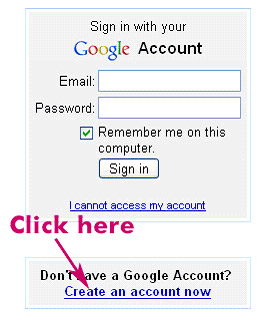
This is NOT creating a Gmail account. You can use any existing email account.
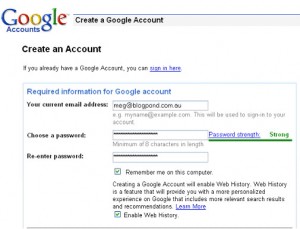
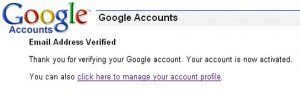
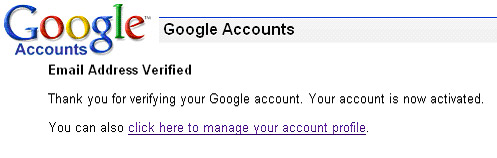
The next screen tells you that Google has sent you an email with a verification link. Before you proceed, look for that email and click on the link. You will be taken to a new screen which says your email address has been verified. Click on the link to manage your account profile.
Look for the section on the right that says “My Services”. Reader should be listed there. Click on the link.
Once you have an account, sign in on the Google home page, and then look at the top of the Google page and find the word, more and click on it. A drop down menu appears, and you need to click on “Reader.” Or, in your account, look for “my services” and click on “Reader.”
You are now set to subscribe to any RSS content available on any website!
How Do I Subscribe to an RSS Feed?
There are a number of ways. I’ll give you two simple ways. For example, on the Home Page of www.ConfidenceAndJoy.com you will see on the right side the standard symbol for RSS – it looks like this:

Simply left click on it and it will take you to a page. The RSS feed address is what will be showing in the address bar at the top of the page. Simply copy that address. Then go to your Google Reader, click on “Add Subscription” and then paste that address in the box, and click on “add.” That’s it!
Now, every time there is a new post on that site it will be automatically added to your Google Reader. You can find them easily, read the ones you want to, and read the ones you’ve missed – all without going to the site!
Another way to do this is to find the Google add button on the web site you wish to receive RSS feeds from. It will look similar to this:

Simply click on it. It will take to you to a Google page, and then you simply click, “Add to Google Reader.”
Your RSS feed subscriptions will be listed on the left. To access just click on it. When you have a one of your RSS feed subscriptions open and you see the list of articles or posts, click on the one you want to read and it will open up the entire article. To get back to the list, simply click on the title.
This is how to use the Google Reader. Other readers operate in a similar way. So follow these simple instructions and subscribe the RSS feed for ConfidenceAndJoy.com and other RSS feed you like.
How Easy Is It?
Make sure you have a Google account.
Find the RSS symbol on the site and click on it.
Copy the address at the top.
Open your Google Reader, click “add subscriptions,” and paste in the address.
Or,
Find the add Google button on the site and click on it.
Then on the page that comes up, click, “Add to Google Reader.”
Please note: I reserve the right to delete comments that are offensive or off-topic.